Anonymous user
Title
Review.

Tune Sweeper is a powerful media management tool for Windows and Mac that helps you clean up your iTunes or Mac Music library with ease. It scans your audio collection to find duplicate items, fix missing track information and artwork, and correct broken entries so you can enjoy a tidy, well-organized experience without the hassle.
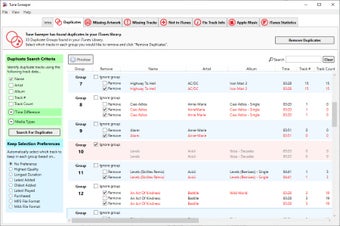
Remove Duplicates — Quickly find and delete duplicate songs, with intelligent grouping and automatic selection options based on quality, play count, or play duration.
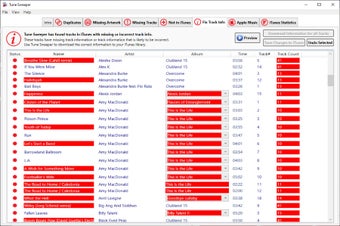
Fix Metadata & Details — Identify mislabeled entries or missing information and automatically update titles, artist names and album data using digital fingerprinting technology.
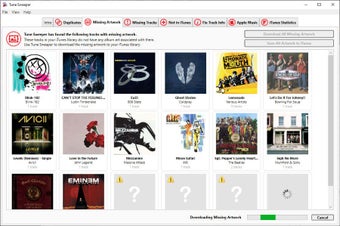
Download Missing Artwork — Tune Sweeper searches online for missing cover art and adds it directly to your files for a polished, complete look.
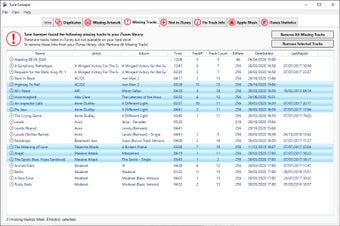
Remove Broken Entries — Detect and remove tracks with exclamation marks (files no longer on your hard drive) to prevent playback errors.
Add Songs from Your Computer — Scan your PC or Mac to find audio files not currently listed in your library and add it with one click.
Subscription Integration & Stats — See which items in your collection come from an Apple Music subscription and explore simple listening statistics about your most played artists and genres.
Download and install Tune Sweeper on your Windows PC or Mac.
Launch the app and let it scan your iTunes or Music app.
Choose a feature - remove duplicates, download album artwork, fix track information and more.
Review the results and choose which items to fix or remove. Use automatic selection preferences or manually pick what to keep.
Clean up with a single click — duplicates are cleared, information is corrected, and your catalogue becomes neat and easy to navigate.
The interface is designed to be intuitive and friendly for all users, regardless of experience, making regular maintenance quick and stress-free.
The latest version offers faster duplicate searches and removal, an updated user interface, improved support for missing artwork and metadata, plus better reporting and presentation of listening statistics — helping you clean up and organize your collection more efficiently than ever before.
Windows:
Works on Windows 7, 8/8.1, 10 and Windows 11.
Requires Microsoft .NET Framework 4.8 and iTunes 10, 11 or 12 installed.
Mac:
Compatible with Intel and Apple Silicon Macs running macOS 11.5 or later (including Big Sur, Monterey, Ventura, Sonoma, etc.).
Works with the Mac Music app.
Free Trial:You can download and try Tune Sweeper with limitations; upgrading to the full version removes all demo restrictions and unlocks full cleanup and fix features.
Whether you have a modest audio collection or an extensive catalogue built over years, Tune Sweeper helps you regain control, remove clutter and fix errors with minimal effort. Its powerful duplicate detection, metadata correction and artwork retrieval features make it an essential tool for anyone serious about their digital music experience.

Free Multimedia Audio Software for Windows

Efficient Audio Tagging with Jaikoz

Fast and powerful multimedia player
Trial version
Windows
Windows 7
English
4.1K
12.77 MB
3 reviews
Review.

Comment.

Brilliant. My iTunes library was such a mess, and I didn't know where to start. A colleague actually recommended Tune Sweeper to me, so I gave it a try. Being able to find all my duplicates and automatically get rid of the ones I want is a godsend and saved me sooooo much time... Worth mentioning as well that the Mac version can get rid of your dupes in the Mac Music App.

Worked great, used to clean up duplicates from iTunes and tidy up my library.

Can help to remove duplicates automatically sometimes. Duplicated music has been an issue for my iTune owing to unknown reason. Now this great tool save the day. I was searching for duplicates in my library, but I was surprised I have no duplicates, the software told me I was 100% clean.... I've also tried other software such as: http://how-to-delete-duplic... I would like to suggest this one. Pros: easy to use Cons: crashed sometimes
Free Multimedia Audio Software for Windows
Efficient Audio Tagging with Jaikoz
Fast and powerful multimedia player

Create music and different sounds

Free universal file opener

Extract the audio from your favorite videos

Unlock your inner musician with a premium DJ mixer

mp3 Search and Downloader is the application for downloading music from the YouTube videos!

Excellent MIDI file converter and synthesizer

Hysolid: High-Resolution Music Player Software

VinylStudio: Digitize Your Vinyl Albums Effortlessly
Acoustic Labs Audio Editor: A Comprehensive Audio Tool

Free Audio Player for Windows Users

Effortless Music Organization with Random Playlist Creator

Nexus Radio: Free Audio Streaming for Windows

MP3, Ogg, WMA, APE tag editor for your music files
Convert Flash movie files to MP3 and WAV

Stylish internet radio player

Forget slow music players

Complete converter for a multitude of file formats